> ## Documentation Index
> Fetch the complete documentation index at: https://portkey-docs-mintlify-add-terraform-provider-docs-72855.mintlify.site/llms.txt
> Use this file to discover all available pages before exploring further.
# Comparing Top10 LMSYS Models with Portkey
[](https://colab.research.google.com/drive/1mBr22Ov8xN6Piy6M38Tr5wOYjpmT%5FIoH#scrollTo=pNpHQn6FlCL1)
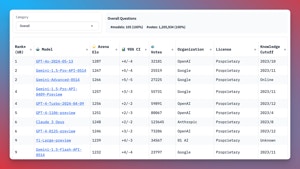
The [LMSYS Chatbot Arena](https://chat.lmsys.org/?leaderboard), with over **1,000,000** human comparisons, is the gold standard for evaluating LLM performance.
But, testing multiple LLMs is a ***pain***, requiring you to juggle APIs that all work differently, with different authentication and dependencies.
**Enter Portkey:** A unified, open source API for accessing over 200 LLMs. Portkey makes it a breeze to call the models on the LMSYS leaderboard - no setup required.
***
In this notebook, you'll see how Portkey streamlines LLM evaluation for the **Top 10 LMSYS Models**, giving you valuable insights into cost, performance, and accuracy metrics.
Let's dive in!
***
#### Video Guide
The notebook comes with a video guide that you can follow along
#### Setting up Portkey
To get started, install the necessary packages:
```sh theme={null}
!pip install -qU portkey-ai openai
```
Next, sign up for a Portkey API key at [https://app.portkey.ai/](https://app.portkey.ai/). Navigate to "Settings" -> "API Keys" and create an API key with the appropriate scope.
#### Defining the Top 10 LMSYS Models
Let's define the list of Top 10 LMSYS models and their corresponding providers.
```JS theme={null}
top_10_models = [
["gpt-4o-2024-05-13", "openai"],
["gemini-1.5-pro-latest", "google"],
## ["gemini-advanced-0514","google"], # This model is not available on a public API
["gpt-4-turbo-2024-04-09", "openai"],
["gpt-4-1106-preview","openai"],
["claude-3-opus-20240229", "anthropic"],
["gpt-4-0125-preview","openai"],
## ["yi-large-preview","01-ai"], # This model is not available on a public API
["gemini-1.5-flash-latest", "google"],
["gemini-1.0-pro", "google"],
["meta-llama/Llama-3-70b-chat-hf", "together"],
["claude-3-sonnet-20240229", "anthropic"],
["reka-core-20240501","reka-ai"],
["command-r-plus", "cohere"],
["gpt-4-0314", "openai"],
["glm-4","zhipu"],
## ["qwen-max-0428","qwen"] # This model is not available outside of China
]
```
#### Add Provider API Keys to Portkey Vault
ALL the providers above are integrated with Portkey - which means, you can add their API keys to Portkey vault and get a corresponding **Virtual Key** and streamline API key management.
| Provider | Link to get API Key | Payment Mode |
| ----------- | ---------------------------------------------------------------- | ---------------------------------------- |
| openai | [https://platform.openai.com/](https://platform.openai.com/) | Wallet Top Up |
| anthropic | [https://console.anthropic.com/](https://console.anthropic.com/) | Wallet Top Up |
| google | [https://aistudio.google.com/](https://aistudio.google.com/) | Free to Use |
| cohere | [https://dashboard.cohere.com/](https://dashboard.cohere.com/) | Free Credits |
| together-ai | [https://api.together.ai/](https://api.together.ai/) | Free Credits |
| reka-ai | [https://platform.reka.ai/](https://platform.reka.ai/) | Wallet Top Up |
| zhipu | [https://open.bigmodel.cn/](https://open.bigmodel.cn/) | Free to Use |
```JSON theme={null}
## Replace the virtual keys below with your own
virtual_keys = {
"openai": "openai-new-c99d32",
"anthropic": "anthropic-key-a0b3d7",
"google": "google-66c0ed",
"cohere": "cohere-ab97e4",
"together": "together-ai-dada4c",
"reka-ai":"reka-54f5b5",
"zhipu":"chatglm-ba1096"
}
```
#### Running the Models with Portkey
Now, let's create a function to run the Top 10 LMSYS models using OpenAI SDK with Portkey Gateway:
```js theme={null}
from openai import OpenAI
from portkey_ai import PORTKEY_GATEWAY_URL, createHeaders
def run_top10_lmsys_models(prompt):
outputs = {}
for model, provider in top_10_models:
portkey = OpenAI(
api_key = "dummy_key",
base_url = PORTKEY_GATEWAY_URL,
default_headers = createHeaders(
api_key="YOUR_PORTKEY_API_KEY", # Grab from https://app.portkey.ai/
virtual_key = virtual_keys[provider],
trace_id="COMPARING_LMSYS_MODELS"
)
)
response = portkey.chat.completions.create(
messages=[{"role": "user", "content": prompt}],
model=model,
max_tokens=256
)
outputs[model] = response.choices[0].message.content
return outputs
```
#### Comparing Model Outputs
To display the model outputs in a tabular format for easy comparison, we define the print\_model\_outputs function:
```js theme={null}
from tabulate import tabulate
def print_model_outputs(prompt):
outputs = run_top10_lmsys_models(prompt)
table_data = []
for model, output in outputs.items():
table_data.append([model, output.strip()])
headers = ["Model", "Output"]
table = tabulate(table_data, headers, tablefmt="grid")
print(table)
print()
```
#### Example: Evaluating LLMs for a Specific Task
Let's run the notebook with a specific prompt to showcase the differences in responses from various LLMs:
On Portkey, you will be able to see the logs for all models:
```js theme={null}
prompt = "If 20 shirts take 5 hours to dry, how much time will 100 shirts take to dry?"
print_model_outputs(prompt)
```
#### Conclusion
With minimal setup and code modifications, Portkey enables you to streamline your LLM evaluation process and easily call 1600+ LLMs to find the best model for your specific use case.
Explore Portkey further and integrate it into your own projects. Visit the Portkey documentation at [https://docs.portkey.ai/](https://docs.portkey.ai/) for more information on how to leverage Portkey's capabilities in your workflow.
 ](https://colab.research.google.com/drive/1mBr22Ov8xN6Piy6M38Tr5wOYjpmT%5FIoH#scrollTo=pNpHQn6FlCL1)
The [LMSYS Chatbot Arena](https://chat.lmsys.org/?leaderboard), with over **1,000,000** human comparisons, is the gold standard for evaluating LLM performance.
But, testing multiple LLMs is a ***pain***, requiring you to juggle APIs that all work differently, with different authentication and dependencies.
](https://colab.research.google.com/drive/1mBr22Ov8xN6Piy6M38Tr5wOYjpmT%5FIoH#scrollTo=pNpHQn6FlCL1)
The [LMSYS Chatbot Arena](https://chat.lmsys.org/?leaderboard), with over **1,000,000** human comparisons, is the gold standard for evaluating LLM performance.
But, testing multiple LLMs is a ***pain***, requiring you to juggle APIs that all work differently, with different authentication and dependencies.
 **Enter Portkey:** A unified, open source API for accessing over 200 LLMs. Portkey makes it a breeze to call the models on the LMSYS leaderboard - no setup required.
***
In this notebook, you'll see how Portkey streamlines LLM evaluation for the **Top 10 LMSYS Models**, giving you valuable insights into cost, performance, and accuracy metrics.
Let's dive in!
***
#### Video Guide
The notebook comes with a video guide that you can follow along
#### Setting up Portkey
To get started, install the necessary packages:
```sh theme={null}
!pip install -qU portkey-ai openai
```
Next, sign up for a Portkey API key at [https://app.portkey.ai/](https://app.portkey.ai/). Navigate to "Settings" -> "API Keys" and create an API key with the appropriate scope.
#### Defining the Top 10 LMSYS Models
Let's define the list of Top 10 LMSYS models and their corresponding providers.
```JS theme={null}
top_10_models = [
["gpt-4o-2024-05-13", "openai"],
["gemini-1.5-pro-latest", "google"],
## ["gemini-advanced-0514","google"], # This model is not available on a public API
["gpt-4-turbo-2024-04-09", "openai"],
["gpt-4-1106-preview","openai"],
["claude-3-opus-20240229", "anthropic"],
["gpt-4-0125-preview","openai"],
## ["yi-large-preview","01-ai"], # This model is not available on a public API
["gemini-1.5-flash-latest", "google"],
["gemini-1.0-pro", "google"],
["meta-llama/Llama-3-70b-chat-hf", "together"],
["claude-3-sonnet-20240229", "anthropic"],
["reka-core-20240501","reka-ai"],
["command-r-plus", "cohere"],
["gpt-4-0314", "openai"],
["glm-4","zhipu"],
## ["qwen-max-0428","qwen"] # This model is not available outside of China
]
```
#### Add Provider API Keys to Portkey Vault
ALL the providers above are integrated with Portkey - which means, you can add their API keys to Portkey vault and get a corresponding **Virtual Key** and streamline API key management.
| Provider | Link to get API Key | Payment Mode |
| ----------- | ---------------------------------------------------------------- | ---------------------------------------- |
| openai | [https://platform.openai.com/](https://platform.openai.com/) | Wallet Top Up |
| anthropic | [https://console.anthropic.com/](https://console.anthropic.com/) | Wallet Top Up |
| google | [https://aistudio.google.com/](https://aistudio.google.com/) |
**Enter Portkey:** A unified, open source API for accessing over 200 LLMs. Portkey makes it a breeze to call the models on the LMSYS leaderboard - no setup required.
***
In this notebook, you'll see how Portkey streamlines LLM evaluation for the **Top 10 LMSYS Models**, giving you valuable insights into cost, performance, and accuracy metrics.
Let's dive in!
***
#### Video Guide
The notebook comes with a video guide that you can follow along
#### Setting up Portkey
To get started, install the necessary packages:
```sh theme={null}
!pip install -qU portkey-ai openai
```
Next, sign up for a Portkey API key at [https://app.portkey.ai/](https://app.portkey.ai/). Navigate to "Settings" -> "API Keys" and create an API key with the appropriate scope.
#### Defining the Top 10 LMSYS Models
Let's define the list of Top 10 LMSYS models and their corresponding providers.
```JS theme={null}
top_10_models = [
["gpt-4o-2024-05-13", "openai"],
["gemini-1.5-pro-latest", "google"],
## ["gemini-advanced-0514","google"], # This model is not available on a public API
["gpt-4-turbo-2024-04-09", "openai"],
["gpt-4-1106-preview","openai"],
["claude-3-opus-20240229", "anthropic"],
["gpt-4-0125-preview","openai"],
## ["yi-large-preview","01-ai"], # This model is not available on a public API
["gemini-1.5-flash-latest", "google"],
["gemini-1.0-pro", "google"],
["meta-llama/Llama-3-70b-chat-hf", "together"],
["claude-3-sonnet-20240229", "anthropic"],
["reka-core-20240501","reka-ai"],
["command-r-plus", "cohere"],
["gpt-4-0314", "openai"],
["glm-4","zhipu"],
## ["qwen-max-0428","qwen"] # This model is not available outside of China
]
```
#### Add Provider API Keys to Portkey Vault
ALL the providers above are integrated with Portkey - which means, you can add their API keys to Portkey vault and get a corresponding **Virtual Key** and streamline API key management.
| Provider | Link to get API Key | Payment Mode |
| ----------- | ---------------------------------------------------------------- | ---------------------------------------- |
| openai | [https://platform.openai.com/](https://platform.openai.com/) | Wallet Top Up |
| anthropic | [https://console.anthropic.com/](https://console.anthropic.com/) | Wallet Top Up |
| google | [https://aistudio.google.com/](https://aistudio.google.com/) |  ```js theme={null}
prompt = "If 20 shirts take 5 hours to dry, how much time will 100 shirts take to dry?"
print_model_outputs(prompt)
```
#### Conclusion
With minimal setup and code modifications, Portkey enables you to streamline your LLM evaluation process and easily call 1600+ LLMs to find the best model for your specific use case.
Explore Portkey further and integrate it into your own projects. Visit the Portkey documentation at [https://docs.portkey.ai/](https://docs.portkey.ai/) for more information on how to leverage Portkey's capabilities in your workflow.
```js theme={null}
prompt = "If 20 shirts take 5 hours to dry, how much time will 100 shirts take to dry?"
print_model_outputs(prompt)
```
#### Conclusion
With minimal setup and code modifications, Portkey enables you to streamline your LLM evaluation process and easily call 1600+ LLMs to find the best model for your specific use case.
Explore Portkey further and integrate it into your own projects. Visit the Portkey documentation at [https://docs.portkey.ai/](https://docs.portkey.ai/) for more information on how to leverage Portkey's capabilities in your workflow.